
Group trainings and corporate workshops
Training in presentation skills, design, and storytelling for teams that want to make their voices heard.










Presentations That Make an Impact
I don’t teach you how to give presentations. I teach you how to promote ideas, gain support, and influence decision-making.
I specialize in the content, structure, and format of presentations that will impress executives, clients, and investors alike.
I work with rhetoric, visual design, and audience psychology. I’ll show you how to craft a clear narrative
and how to present it in a way that makes people want to listen.
Choose from a wide range of courses
Presentation Skills
Confident delivery, clear structure, and compelling verbal and nonverbal communication. Your team will learn to present with confidence, even to the most demanding audiences. The program includes techniques for managing nerves, body language, and presentation training with video analysis.
Online Presentations
Holding an audience’s attention through a screen is a different skill set than presenting in a live setting. Your team will learn how to manage attention, use body language, and engage the audience in a virtual environment. The training also covers how to effectively conduct hybrid meetings.
Elevator Pitch
Find your story, sell yourself, your ideas, and your project. If we only have a few minutes for a presentation, we need to change the way we think about presentations. Learn to structure your sentences effectively, speak with confidence, and deliver a powerful presentation—even in the toughest moments.
Business storytelling
A good story sells better than even the best data. You’ll learn how to turn facts into a message that captures attention and sticks in people’s minds. Together, we’ll explore the structure of a story, its hero, and ways to use suspense to keep your audience engaged.
Creating Presentations with AI
Efficiency, speed, and minimal unnecessary clicking. These are the main reasons for using artificial intelligence. AI will prepare the slides. But it’s up to you to make the case. In our training, we combine effective prompts with traditional approaches to ensure professional results.
Are you looking for help with slides? Check out the second category.
Presentation Design
Clear, well-organized slides that guide the audience’s attention and reinforce your message. Your team will learn to create visually clean presentations that will impress both clients and management. The course covers graphic design principles, and other advanced techniques.
Storytelling with Data
Data without a story won’t capture anyone’s attention. You’ll learn how to present numbers in a way that leads to quick understanding and decision-making. We’ll learn how to define the main message, structure the story, and visualize data with a clear focus on what matters most.
Canva: Slides for Non-Designers
Professional slides without a background in graphic design. In this training, you’ll learn how to work with templates, color schemes, and other visual elements to ensure your presentations look cohesive and professional.
Data visualization for presentations
Comprehensive data presented clearly and concisely. Your colleagues will learn to create charts and tables that grab attention and quickly convey key messages. The course includes animations, diagrams, and alternative forms of data visualization.
How to Use PowerPoint
Unlock the full potential of the tool your team uses every day. The goal of this training is to teach you how to work smarter in PowerPoint, streamline repetitive tasks, and create presentations more efficiently without unnecessary frustration or wasted time.
Think-cell for Data visualization
Less manual work and more professionalism. Your team will learn how to use think-cell to quickly create and edit data slides that will hold up in any environment. The training covers charts, infographics, and presentation design principles.
Are you looking for help with presentation skills and public speaking? Check out the second category.
Not sure where to start? Drop me a line.
Let’s discuss what your team needs, and we’ll work together to choose the right format.
How to Persuade an Audience
Presentation skills
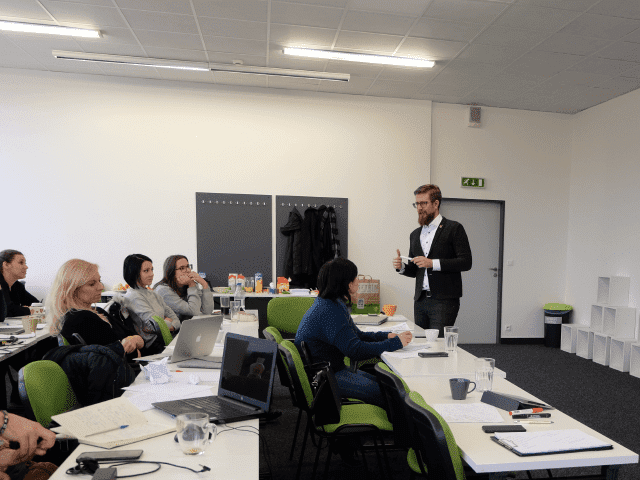
The primary goal of the course is to improve and enhance participants’ overall ability to present effectively to a larger group of people.
You will learn best practices for structuring presentations and discover the principles that govern them. You will enhance your verbal and nonverbal communication skills and learn techniques for managing stage fright.
The training includes presentation practice and video analysis of participants. Everyone will receive targeted feedback on their performance.

Business storytelling
During the training, participants will gradually transform their presentations into compelling stories that will capture the attention of their target audience, even amid today’s information overload.
Together, we’ll explore the themes of stories, plots, and heroes, and discover how these elements can be applied in our daily work environment to make our presentations truly unique and unforgettable.
Participants leave the training with a clear plan and materials that will help them structure their future presentations.

Online Presentations
The online environment is not simply a digital version of an in-person presentation. It is a different medium with different rules and a different way of capturing the audience’s attention.
The training focuses on voice and body language, engaging the audience in a virtual environment, and managing hybrid meetings. We cover setting up the presentation space and specific techniques for maintaining authority and holding the audience’s attention even through a screen.
You’ll leave the training with habits that work regardless of which platform your team is currently using.
Have you found the solution you need?
Let's take our first steps together.
How to Create Clear and Concise Slides
Presentation Design
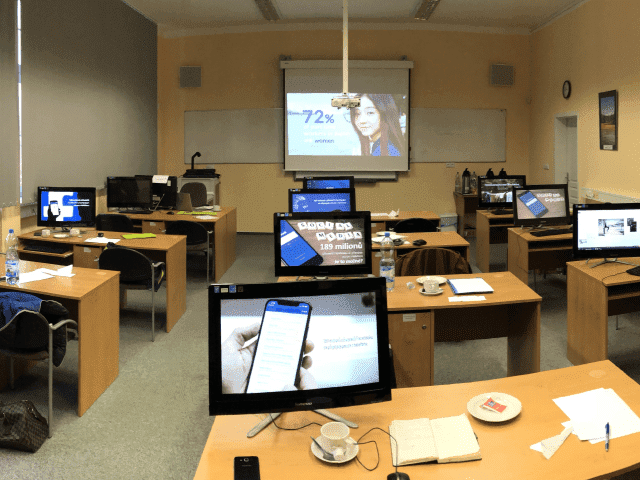
Presentation Design is a training course on creating clear and understandable messages. The course focuses on how to create slides that support the main idea, guide the audience’s attention, and help them remember the message.
Participants will learn to work with the basic principles of slide design, including contrast, white space, and images, and to use more effective alternatives to traditional bullet points.
The course also covers data visualization using tables and charts, the gradual highlighting of information, and practical ways to streamline your work in PowerPoint.


Data visualization
This training is designed for professionals who work with data and need to present it clearly, accurately, and with a clear focus on what matters most.
The course focuses on best practices for data visualization, creating charts and tables that grab attention, and techniques for quickly extracting key messages from data. Participants will learn to work with animations, diagrams, and alternative forms of visualization so that the data supports the message rather than overwhelming it.
This hands-on training helps transform complex data into a clear, compelling, and understandable output.
Storytelling with Data
The course focuses on working with data and presenting it through storytelling. It’s not just about choosing the right charts and tables, but about the ability to guide the audience toward understanding what is truly important and why they should care.
Participants will learn the basics of storytelling in the context of data presentations. They will learn to analyze their audience, define the hero and the “villain,” start with a clear “why,” and build a story structure that can be visualized clearly.
The result is a presentation in which the data makes sense, the story holds the audience’s attention, and the message leads to a quick decision.

Canva: Slides for Non-Designers
Canva is a simple and accessible tool for creating visually appealing presentations, even without a graphic design background. This training is ideal for teams that want to create attractive and easy-to-understand slides quickly and independently.
Participants will learn to use templates effectively, edit content without disrupting the design, and create presentations that are clear, modern, and visually consistent.
We emphasize simplicity, consistency, and practical applicability in everyday work.
The result is presentations that look professional, save time, and help the brand appear consistent and trustworthy.

Think-cell for Data visualization
Think-cell is a tool that transforms PowerPoint from a “manual process” into scalable reporting. This training is designed for professionals who create data presentations for executives and want to speed up slide production, maintain consistency, and produce charts that stand up to scrutiny in both internal and client environments.
We’ll demonstrate how to use think-cell for quickly creating and editing data slides, how to work with objects, and how to apply presentation design principles to data outputs so that the message is clear at a glance.
The result is fewer manual adjustments, less “pixel-pushing,” and more time for decision-making while maintaining high visual quality and data credibility.

How to Use PowerPoint
Mastering PowerPoint: From the Basics to Advanced Features. This course is designed for users who want to work more efficiently, organize their slides more effectively, and unlock the full potential of the tool for both everyday presentations and professional outputs.
PowerPoint isn’t just about dragging and dropping text and images; we’ll learn how to work smart in PowerPoint: using templates and automating repetitive tasks.
The course guides participants through practical exercises to master PowerPoint so they can create presentations faster, better, and without unnecessary frustration. All with an emphasis on saving time and visual quality.
A good presentation is a tool.
A strong presentation is an advantage.
It helps bring ideas to life where they really matter.



















Feedback from participants
Ondra is a fantastic instructor. The way he explains presentation structure, data analysis, and visuals—and ties it all together into a cohesive narrative—is absolutely flawless. He has an incredible ability to tailor the training perfectly to the group, whether they’re analysts, data scientists, or managers. Participants leave the training enthusiastic, motivated, and, most importantly, equipped with practical tools that work in their day-to-day work lives.
Lenka Krúpová
HR Business partner
ČEZ
You know that feeling when, after just a few minutes of a training session, you’re wondering whether to leave or stay and suffer through it? Unfortunately, I’ve been through more of those than I’d like. That’s why I’m happy to recommend Ondra’s training. Why? Energy. He keeps your attention from start to finish. Practicality. It’s not theory for theory’s sake, but tips you’ll actually use. I’ve honestly said to myself several times: “If I’d known this sooner, I would have saved myself a lot of time and stress.”
Libor Kočí
Regional Sales Director
UNIQA
Get your workshop right now!
Did my training offer catch your interest, and would you like to learn more? Let's arrange a meeting or a phone call.